
Online Protractor
Updated: November 2026
Measure any angle on your screen with this online protractor. Drag the arms to match the two sides of an angle and read the value in degrees. No printout, no signup and no download are needed. It works as a virtual protractor for homework and workshop layouts.
Measure an angle
90° Right angle
180 degree mode measures angles up to a straight line. Switch to 360 degree mode for reflex angles.
On-screen measurements depend on calibration.
Calibration loaded from this browser. Angles are measured in degrees, so calibration does not change the angle.
Quick answer: A right angle is 90 degrees and a straight angle is 180 degrees. Measure angle online: drag the red arm to the second side and read the number.
What is an online protractor?
An online protractor is a measuring tool that runs in your web browser and shows an angle in degrees on screen. It works like the clear plastic protractor in a school geometry set, with a centre point, a baseline and a curved scale. Nothing needs printing: drag the arms and the value updates. This angle measure tool is a protractor on screen and an angle finder online.
How to use this protractor
This guide shows how to measure an angle in three steps: place the centre, drag the second arm, and read the result.
Set the centre
Place the centre of this degree protractor on the corner where the two sides meet. Keep the fixed arm along the lower side.
Drag the second arm
Drag the red handle until the moving arm lies along the second side, or use the arrow keys. Hold Shift to jump ten degrees.
Read the value
Read the number and check the type beside it. If you know the angle already, type it into the exact-angle box and press Set angle.
Angle types chart
Every angle fits one of six types.
| Angle type | Degrees | Real example |
|---|---|---|
| Acute angle | More than 0° and less than 90° | A roof slope is about 30°, and the tip of a pizza slice is narrower still. |
| Right angle | Exactly 90° | A book corner is 90°, and so is the corner of a sheet of paper. |
| Obtuse angle | More than 90° and less than 180° | An open laptop is about 120° when the screen leans back past upright. |
| Straight angle | Exactly 180° | A book opened completely flat, or the edge of a ruler, forms 180°. |
| Reflex angle | More than 180° and less than 360° | The larger sweep between the hands of a clock at 4 o’clock is 240°. |
| Full angle | Exactly 360° | A skateboarder landing a full turn completes 360°. |
How to read a protractor: inner and outer scales
A 180 degree protractor carries two scales that run in opposite directions: the outer scale starts at 0 on the left, and the inner scale starts at 0 on the right. Always count from the side where your fixed arm sits on 0.
The fixed arm sits on the 0 at the right, and the second side crosses at 50: the angle is 50 degrees.
The same angle reads 130 on the outer scale and 50 on the inner scale. The fixed arm was on the inner zero, so 50 is correct.
The fixed arm sits on the 0 at the left, so the outer scale counts. The second side crosses at 120 degrees, an obtuse angle.
How to read angles, and measuring an angle in a photo
Angle types describe how far one side has turned away from the other. Under 90 degrees an angle stays acute, like the 30 degree slope of a roof. At exactly 90 it becomes a right angle. Between 90 and 180 it opens into an obtuse angle, and at 180 the sides form a straight line. Past 180 the angle is reflex.
To measure angle from photo uploads, use the loader below. Pick an image from your device and it appears here. Line the centre up with the corner, set the arms along the two edges, and read the value. The image is read locally and never sent to any server.
Carpenters use angle work: a picture frame joins two 45 degree mitre cuts into a 90 degree corner, and a 30 degree roof pitch sheds rain. For geometry homework, the angles of a triangle add up to 180 degrees, so two give you the third.
Your photo stays on your device. It is never uploaded.
No photo loaded yet. Choose a photo above and it will appear here with the protractor overlay on top of it.
Drag the overlay over the corner in your photo.
Real-world examples
School geometry
Homework asks for the angles of a triangle, which add up to 180 degrees. Measure two, subtract from 180, and check the third.
Woodworking mitre cuts
A picture frame corner joins two pieces cut at 45 degrees each. Set the tool to 45 and test the joint on scrap wood first.
Sewing and fabric work
Bias tape and quilt pieces are cut at 45 degrees so the fabric folds neatly. Patchwork blocks rely on exact 60 and 120 degree angles.
DIY around the home
Shelf brackets need a true 90 degrees or the shelf tilts. A garden ramp and a stair handrail at 35 degrees are easier to plan when you test first.
Accuracy tips and common mistakes
- Centre first. A centre a few millimetres off the corner shifts a small angle by several degrees.
- Extend short sides. Line the arm up with the side’s direction, and imagine the line carried further.
- Use arrow keys for fine work. Dragging lands within a few degrees; arrow keys move one degree.
- Watch for the wrong scale. The two readings add up to 180, so a narrow angle reading 140 is wrong.
- Do not trust a tilted photo. Photograph the corner square-on, from directly in front.
- Check against a known corner. Test a book corner; if tool and book agree, your setup is sound.
Checking a shelf or a picture? See how to check if something is level.
Frequently asked questions
How do I measure an angle online?
Drag the moving arm until it lines up with one side of your angle, with the fixed arm on the other side. Read the number in the readout, or type an exact value into the box. The readout also names the angle type.
How accurate is an online protractor?
It reads to 0.1 degree on screen and is accurate to about one degree when the arms are placed carefully, which matches the smallest marks on a school protractor. Zoom in on small angles and align the centre exactly on the corner.
How do I read a 360 degree protractor?
Place the centre on the corner and the fixed arm along one side, then follow the moving arm around the circle to the second side. Read the number where it crosses the scale, from 0 to 360 degrees. Angles past 180 are reflex angles.
What is a right angle?
A right angle measures exactly 90 degrees, one quarter of a full turn. Its two sides are perpendicular, so one runs straight up while the other runs flat. The corner of a book or a sheet of paper is a right angle.
Can I measure an angle from a photo?
Yes. Upload a photo with the loader in the angle types section, then drag the protractor overlay so its centre sits on the corner and its arms follow the two edges. The photo is read locally in your browser and never uploaded.
What is the difference between 180 and 360 protractors?
A 180 degree protractor is a semicircle that measures angles up to a straight line. A 360 degree protractor is a full circle that also measures reflex angles. Use 180 for triangles, and 360 when the angle wraps the long way round.
More Free Measuring Tools
Using a protractor correctly
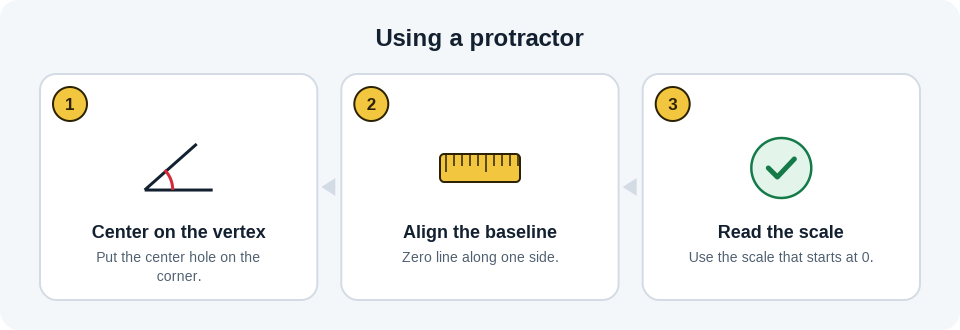
Read the scale that starts at 0° on the side you aligned. Step-by-step help: how to use a protractor. For maths and code, convert with degrees to radians; for tilt and slope, use the bubble level.